

Tips to Improve Your Web Design Skills: A Detailed Guide
Tips to Improve Your Web Design Skills: A Detailed Guide

How Can I Web Design? A Beginner’s Guide to Creating Stunning Websites
Web design is an essential skill in today’s digital world. Whether you’re looking to create a personal blog, an online portfolio, or a business website, knowing how to design a website can open up countless opportunities. But if you’re wondering, “How can I web design?” you’re not alone. Many beginners feel overwhelmed by the process.
This guide will walk you through everything you need to know about web design, from understanding what it is to learning how to design your own website. By the end, you’ll have the knowledge and confidence to create a website that looks professional and functions seamlessly.
What Is Web Design?
Understanding the Basics
Web design refers to the process of creating the visual and functional elements of a website. It involves planning, conceptualizing, and arranging content online. Web design encompasses several aspects, including:
- Layout: How information is structured and displayed on a page.
- Color Scheme: The choice of colors that align with the website’s purpose and branding.
- Typography: The fonts and text styles used to enhance readability and aesthetics.
- Graphics: Images, icons, and other visual elements that make the website engaging.
- User Experience (UX): Ensuring the website is easy to navigate and user-friendly.
- Responsiveness: Making sure the website works well on all devices, including desktops, tablets, and smartphones.
What Does a Web Designer Do?
A web designer is responsible for creating the look and feel of a website. They combine creativity with technical skills to design layouts, choose color schemes, and ensure the site is visually appealing. Web designers also collaborate with developers to bring their designs to life.
If you’re asking, “How do I become a website designer?” the good news is that you don’t need a formal degree to start. With the right tools and resources, anyone can learn web design.
How to Design a Website: Step-by-Step Guide
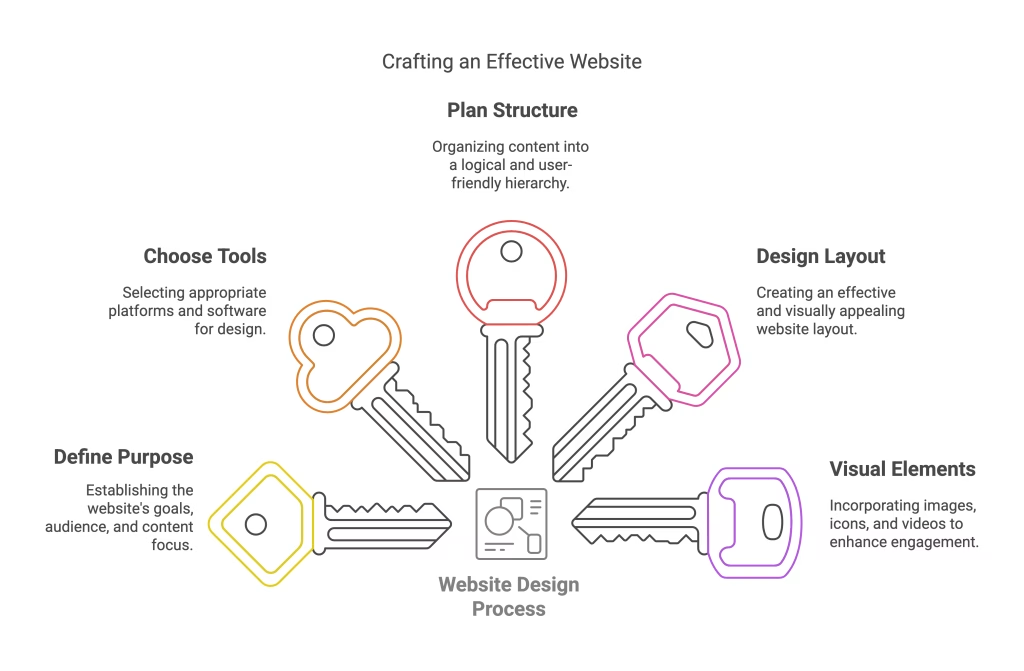
Step 1: Define Your Website’s Purpose
Before diving into design, ask yourself:
- What is the goal of my website?
- Who is my target audience?
- What content will I include?
Having a clear purpose will guide your design decisions and ensure your website meets its objectives.
Step 2: Choose the Right Tools
There are many tools available to help you design a website, even if you have no coding experience. Some popular options include:
- Website Builders: Platforms like Wix, Squarespace, and Weebly offer drag-and-drop functionality, making it easy to design a website online.
- Content Management Systems (CMS): WordPress is a popular CMS that provides flexibility and customization options.
- Design Software: Tools like Adobe XD, Figma, and Sketch are great for creating mockups and prototypes.
Step 3: Plan Your Website Structure
A well-organized website is key to a positive user experience. Start by creating a sitemap, which outlines the main pages and their hierarchy. Common pages include:
- Home
- About
- Services or Products
- Blog
- Contact
Step 4: Design the Layout
The layout is the foundation of your website’s design. Consider the following:
- Header: Include your logo, navigation menu, and possibly a call-to-action (CTA).
- Hero Section: This is the first thing visitors see. Use compelling visuals and text to grab their attention.
- Content Sections: Organize information into clear, digestible sections.
- Footer: Add important links, contact information, and social media icons.
Step 5: Choose a Color Scheme and Typography
Your color scheme and typography should reflect your brand’s identity. Stick to 2-3 primary colors and 1-2 fonts to maintain consistency. Tools like Coolors and Google Fonts can help you make informed choices.
Step 6: Add Visual Elements
Images, icons, and videos can make your website more engaging. Ensure all visuals are high-quality and optimized for fast loading times.
Step 7: Ensure Responsiveness
With more people browsing on mobile devices, it’s crucial to design a website that looks great on all screen sizes. Most website builders and CMS platforms offer responsive templates, but always test your design on multiple devices.
Step 8: Test and Launch
Before going live, test your website for functionality, speed, and compatibility. Check for broken links, typos, and formatting issues. Once everything looks good, it’s time to launch!
How to Learn Web Design
Online Courses and Tutorials
There are countless resources available to help you learn web design. Platforms like Coursera, Udemy, and YouTube offer courses for beginners and advanced learners.
Practice, Practice, Practice
The best way to improve your web design skills is by practicing. Start with small projects, like designing a personal blog or portfolio, and gradually take on more complex tasks.
Join Online Communities
Web design forums and social media groups are great places to connect with other designers, ask questions, and share your work.
Is Web Design Hard?
Web design can seem intimidating at first, but it’s not as hard as it looks. With the right tools and a willingness to learn, anyone can master the basics. Remember, even professional web designers started as beginners.
Exploring Ready-Made Website Building Strategies
If you’re asking, “How can I web design without coding skills?” ready-made website builders like Wix, Shopify, and Squarespace are excellent solutions. These platforms are designed to simplify the web design process, making it accessible to everyone, regardless of technical expertise. Let’s dive into how these tools work and how they compare to building a website using WordPress.
What Are Ready-Made Website Builders?
Ready-made website builders are platforms that provide pre-designed templates and drag-and-drop functionality, allowing users to create websites without writing a single line of code. They are ideal for beginners, small businesses, and anyone looking to launch a website quickly.
Popular Ready-Made Website Builders
- Wix
Wix is one of the most user-friendly website builders available. It offers hundreds of customizable templates, a drag-and-drop editor, and a wide range of features like e-commerce, blogging, and SEO tools. Wix is perfect for those who want a hassle-free way to design a website. - Shopify
Shopify is a specialized platform for building online stores. It provides everything you need to create an e-commerce website, including payment gateways, inventory management, and marketing tools. If your goal is to sell products online, Shopify is a great choice. - Squarespace
Squarespace is known for its stunning, design-focused templates. It’s a popular choice for creatives, photographers, and small businesses that want a visually appealing website. Squarespace also offers built-in analytics and SEO tools.
How Do Ready-Made Builders Compare to WordPress?
While ready-made website builders are convenient, WordPress offers more flexibility and control. Here’s a breakdown of the key differences:
Ease of Use
- Ready-Made Builders: Platforms like Wix and Squarespace are designed for beginners. Their drag-and-drop editors make it easy to design a website without any technical knowledge.
- WordPress: WordPress has a steeper learning curve, especially if you’re using the self-hosted version (WordPress.org). However, it offers more customization options for those willing to learn.
Customization
- Ready-Made Builders: These platforms provide pre-designed templates that you can customize to a certain extent. However, you’re limited to the features and design options they offer.
- WordPress: With WordPress, you have complete control over your website’s design and functionality. You can choose from thousands of themes and plugins to create a truly unique website.
Cost
- Ready-Made Builders: Most website builders operate on a subscription model, which includes hosting and support. While this can be convenient, costs can add up over time.
- WordPress: WordPress itself is free, but you’ll need to pay for hosting, a domain name, and possibly premium themes or plugins. This can be more cost-effective in the long run, especially for larger websites.
Scalability
- Ready-Made Builders: These platforms are great for small to medium-sized websites. However, they may not be the best choice for large, complex sites with high traffic.
- WordPress: WordPress is highly scalable and can handle websites of all sizes. It’s the preferred choice for businesses and individuals who plan to grow their online presence.
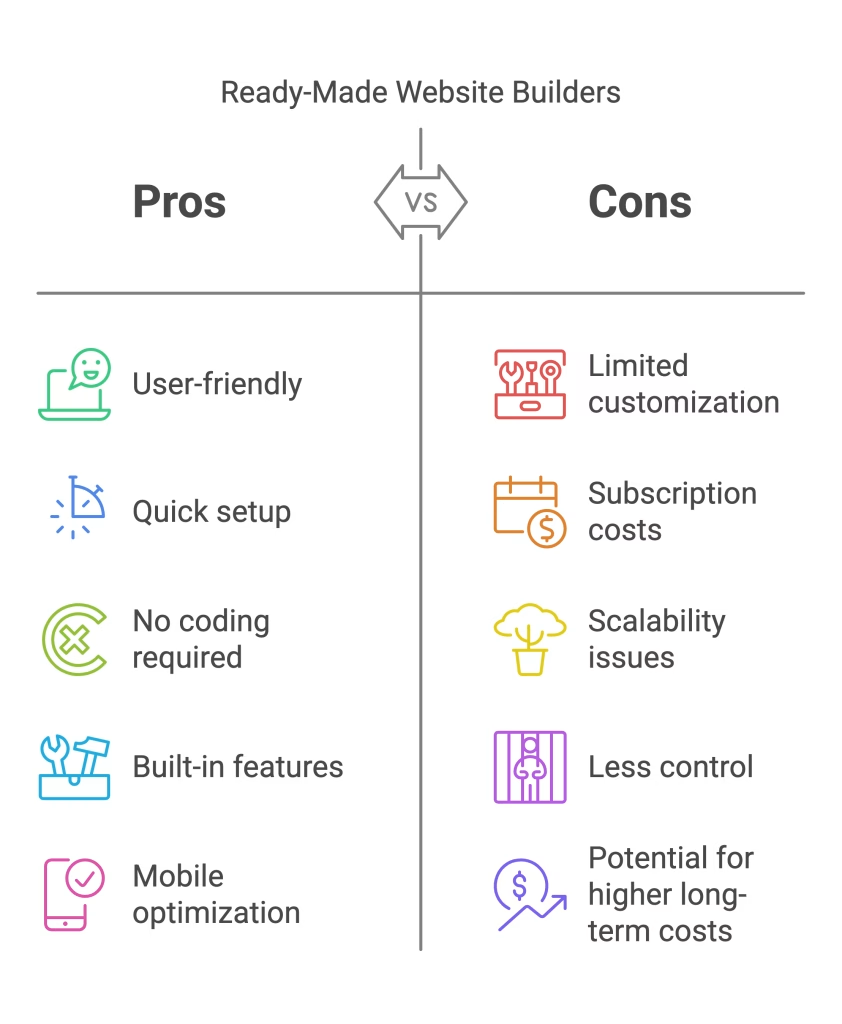
Which Option Is Right for You?
The choice between a ready-made website builder and WordPress depends on your goals, technical skills, and budget.
- Choose a Ready-Made Builder If:
- You want to design a website quickly and easily.
- You don’t have coding skills or technical knowledge.
- You’re building a small website or online store.
- Choose WordPress If:
- You want full control over your website’s design and functionality.
- You’re willing to invest time in learning the platform.
- You’re planning to build a large or complex website.
Tips for Designing a Website with Ready-Made Builders
If you decide to use a ready-made website builder, here are some tips to help you get started:
- Choose the Right Template
Select a template that aligns with your website’s purpose and branding. Most platforms allow you to preview templates before applying them. - Customize Your Design
Use the drag-and-drop editor to customize your template. Add your own text, images, and colors to make the design unique. - Optimize for Mobile
Ensure your website looks great on all devices by testing its responsiveness. Most website builders automatically optimize templates for mobile, but it’s always good to double-check. - Add Essential Features
Depending on your website’s purpose, you may need to add features like contact forms, social media links, or an online store. Most platforms offer built-in tools for these functionalities. - Use SEO Tools
Many website builders include SEO tools to help you optimize your site for search engines. Take advantage of these features to improve your website’s visibility.
Conclusion
Designing a website may seem like a daunting task, but with the right approach, it’s entirely achievable. By understanding what web design is, following a structured process, and utilizing the right tools, you can create a website that stands out.
Whether you’re looking to design your own website or pursue a career in web design, the key is to start small, keep learning, and stay consistent. So, the next time you ask, “How can I web design?” remember that the journey begins with a single step.
By following this guide, you’ll be well on your way to designing a website that not only looks great but also delivers a fantastic user experience. Happy designing!
AND
If you have any questions, feel free to reach out to us here, and we’ll help you out in your journey of creating a website.

Related articles

How to Create a Personal Website for College Apps Reddit:2025 Guide
Why a Personal Website Matters for College Applications A personal website can be a game-changer for your college application. It...

Top Strategies for a Professional Looking Website, Reddit-Approved:2025
Introduction: Why a Professional-Looking Website Matters? A professional looking website, Reddit users often emphasize, is essential for credibility and success....

Web Design for Small Businesses: The Complete Growth Guide
Introduction In today’s digital world, having a strong online presence is no longer optional, it’s a necessity. For small businesses,...

Ready to Ship Your Vibe Coded App?
You've already done the hard part — validating your idea and building something that works. Let's turn it into a product your users can trust and your business can scale.