

Case Study Web Page Design: Crafting Compelling Stories of Digital Success
Case Study Web Page Design: Crafting Compelling Stories of Digital Success

In the competitive world of web design and development, case studies are powerful tools that demonstrate your expertise and showcase your successes. A well-designed case study web page design can be the difference between winning a new client or losing them to a competitor. This comprehensive guide will explore the art of crafting compelling case study web pages, drawing insights from various website case study examples, and providing practical tips for creating standout case studies.
Understanding the Importance of Case Studies in Web Design
Case studies are more than just portfolio pieces; they’re storytelling devices that allow potential clients to envision how you can solve their problems. A well-crafted web case study:
- Builds trust and credibility
- Demonstrates problem-solving skills
- Showcases real-world results
- Helps potential clients relate to your work
Key Elements of an Effective Case Study Web Page Design
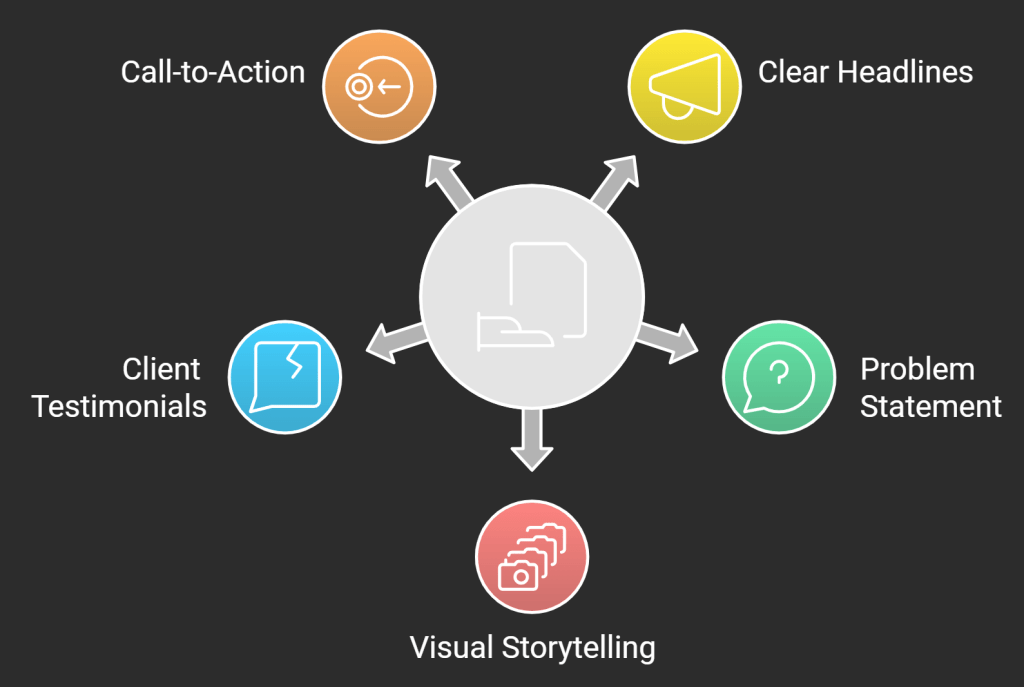
To create a case study website that resonates with your audience, consider incorporating these essential elements:
1. Clear and Compelling Headlines
Your headline should immediately grab attention and summarize the key achievement of the case study. For example:
“How We Increased E-commerce Conversions by 150% for XYZ Company”
2. Problem Statement
Clearly articulate the challenge your client faced. This helps potential clients relate to the situation and understand the context of your work.
3. Solution Overview
Provide a concise summary of how you approached the problem and what strategies you implemented.
4. Visual Storytelling
Incorporate before-and-after screenshots, mockups, or interactive elements to visually demonstrate the transformation.
5. Key Metrics and Results
Use data visualization techniques to highlight the measurable outcomes of your work. This could include graphs, charts, or infographics.
6. Client Testimonials
Include quotes from satisfied clients to add credibility and a human touch to your case study.
7. Call-to-Action (CTA)
End your case study with a clear CTA, encouraging potential clients to reach out or learn more about your services.
Web Development Case Studies: Best Practices
When creating case studies for web development projects, consider these best practices:
- Focus on the Process: Detail your development methodology, from initial planning to final deployment.
- Highlight Technical Challenges: Explain how you overcame specific technical hurdles.
- Showcase Performance Improvements: Use metrics like page load times or server response rates to demonstrate the technical impact of your work.
- Include Code Snippets: If appropriate, share small code samples to illustrate innovative solutions.
- Emphasize Scalability and Future-Proofing: Explain how your solution sets the client up for long-term success.
Site Case Study Design Tips
To make your case study web design truly stand out:
- Use a Consistent Layout: Create a template that you can use across all your case studies for a cohesive look.
- Implement Responsive Design: Ensure your case studies look great on all devices.
- Incorporate Interactive Elements: Consider using sliders, hover effects, or scrolling animations to engage visitors.
- Optimize for SEO: Use relevant keywords naturally throughout your case study content.
- Include Related Case Studies: At the end of each case study, suggest similar projects to keep visitors engaged.
Learning from Website Case Study Examples
Analyzing successful case studies from other web design agencies can provide valuable insights. Here are a few noteworthy examples:
- Airbnb’s Design System: Airbnb’s case study on their design system showcases how they unified their visual language across platforms.
- Dropbox’s Rebrand: This case study details the process behind Dropbox’s major rebrand, offering insights into its design decisions.
- Slack’s Website Redesign: Slack’s case study on their website redesign emphasizes the importance of user feedback and iterative design.
Creating Your Own Web Page for Case Study
When designing your own case study web page, follow these steps:
- Gather Data: Collect all relevant information, including initial briefs, process documentation, and final results.
- Create an Outline: Structure your case study with a clear beginning, middle, and end.
- Write Compelling Copy: Focus on telling a story that engages your audience and highlights your expertise.
- Design the Layout: Use your brand’s visual style while ensuring the design complements the content.
- Add Visual Elements: Incorporate images, videos, or interactive elements to enhance the storytelling.
- Optimize for Search Engines: Use relevant keywords and meta descriptions to improve visibility.
- Test and Refine: Gather feedback and make improvements to ensure your case study is as effective as possible.
Conclusion: Elevating Your Web Design Portfolio with Compelling Case Studies
A well-designed case study web page is an invaluable asset in your digital marketing toolkit. By showcasing your best work through engaging storytelling and thoughtful design, you can effectively demonstrate your expertise and win more clients. Remember, the key to a successful case study lies in balancing informative content with visually appealing design while keeping your target audience’s needs and interests at the forefront.

FAQs
- What should I include in a web design case study?
Include the project background, challenges faced, your solution, the process you followed, visual examples of your work, and the results achieved. Don’t forget to add client testimonials for added credibility. - How long should a case study web page be?
While there’s no strict rule, aim for a length that provides enough detail without overwhelming the reader. Typically, 800-1500 words is a good range, but the key is to be comprehensive yet concise. - How many case studies should I feature on my website?
Quality trumps quantity. Start with 3-5 of your best and most diverse projects. As you complete more noteworthy projects, you can add to your collection. - Should I use a template for my case study web pages?
Using a consistent template can help maintain a professional look across your case studies. However, ensure the template is flexible enough to highlight the unique aspects of each project. - How can I make my case study web page more engaging?
Use a mix of text, images, and interactive elements. Consider adding video testimonials, before-and-after sliders, or animated data visualizations to keep visitors engaged. - Is it necessary to include specific numbers and data in my case studies?
Yes, whenever possible. Concrete data and metrics add credibility to your case study and provide tangible evidence of your success.

Related articles

Optimize Mobile UX: Top 5 Practices for Better Engagement
Credit:- Freepik Focusing on mobile user experience is very important for online business success. Almost 60% of internet traffic comes...

The Ultimate Guide to Building a High-Performing Law Firm Website in 2025
Credit:- Canva Your law firm website design is more than just a digital presence—it’s your first impression, your brand, and...

Best Practices for MVP Development in 2025
Minimum Viable Product (MVP) development has evolved significantly in 2024, becoming a cornerstone for businesses aiming to validate ideas, attract...

Ready to Ship Your Vibe Coded App?
You've already done the hard part — validating your idea and building something that works. Let's turn it into a product your users can trust and your business can scale.